WordPress has finally made Tweeting blog posts directly to Twitter possible.
I have already written about my first WordPress direct to Twitter blog post over on SearchMarketingCommunications.com.

1st WordPress Blog Post Tweeted To Twitter
As expected, WordPress converts all of the WordPress.com blogs posted to Twitter to their recently added shortened url service – WP.me.
I wasn’t the first one to Tweet from WordPress.com as evidenced by all of these posts found in a Twitter search for “Posted to WP.com”.
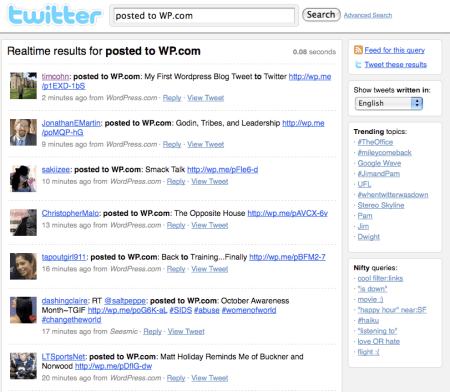
Posted to WP.com
In addition to their My blog Admin page, WordPress.com bloggers can also find an Authorize Twitter link on the right rail of their add new post page.
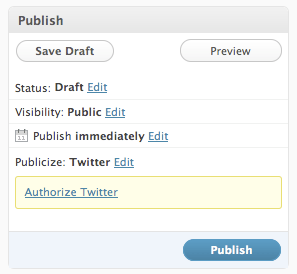
Publicize Twitter
WordPress bloggers probably ought to save a draft and preview their post before they publish it to make sure the post’s title doesn’t need to be changed which in turn would render the post’s WP.me shortened url moot.
Tags: Bloggers, Publicize Twitter, Wordpress.com Tweets to Twitter, WP.com, Wp.Me
 @TimCohn | Author Tim Cohn's Blog
October 14, 2009 at 3:16 pm |
No doubt WordPress is far better than Blogspot :)..
December 12, 2009 at 7:01 pm |
I tried to authorize Twitter using the link, and this is the message I got:
Woah there!
This page is no longer valid. It looks like someone already used the token information you provided. Please return to the site that sent you to this page and try again … it was probably an honest mistake.
I got this message several days ago, so I thought I would come back today and try again, but got the same message. How can I correct this?
December 12, 2009 at 11:16 pm |
Do you have more than one WordPress blog?
December 13, 2009 at 11:33 am
No, the only one I have is:
http://susanrb.wordpress.com
December 14, 2009 at 5:55 pm
Did you type in your Twitter account information correctly. If so, can you replicate the message, take a screen shot and email it to me? I will see if I can figure out what happened.
December 16, 2009 at 1:56 pm
I never reached a screen to log into Twitter.
I can tweet from Google Reader, so for me my problem is solved. But I can’t be the only person with this issue.